


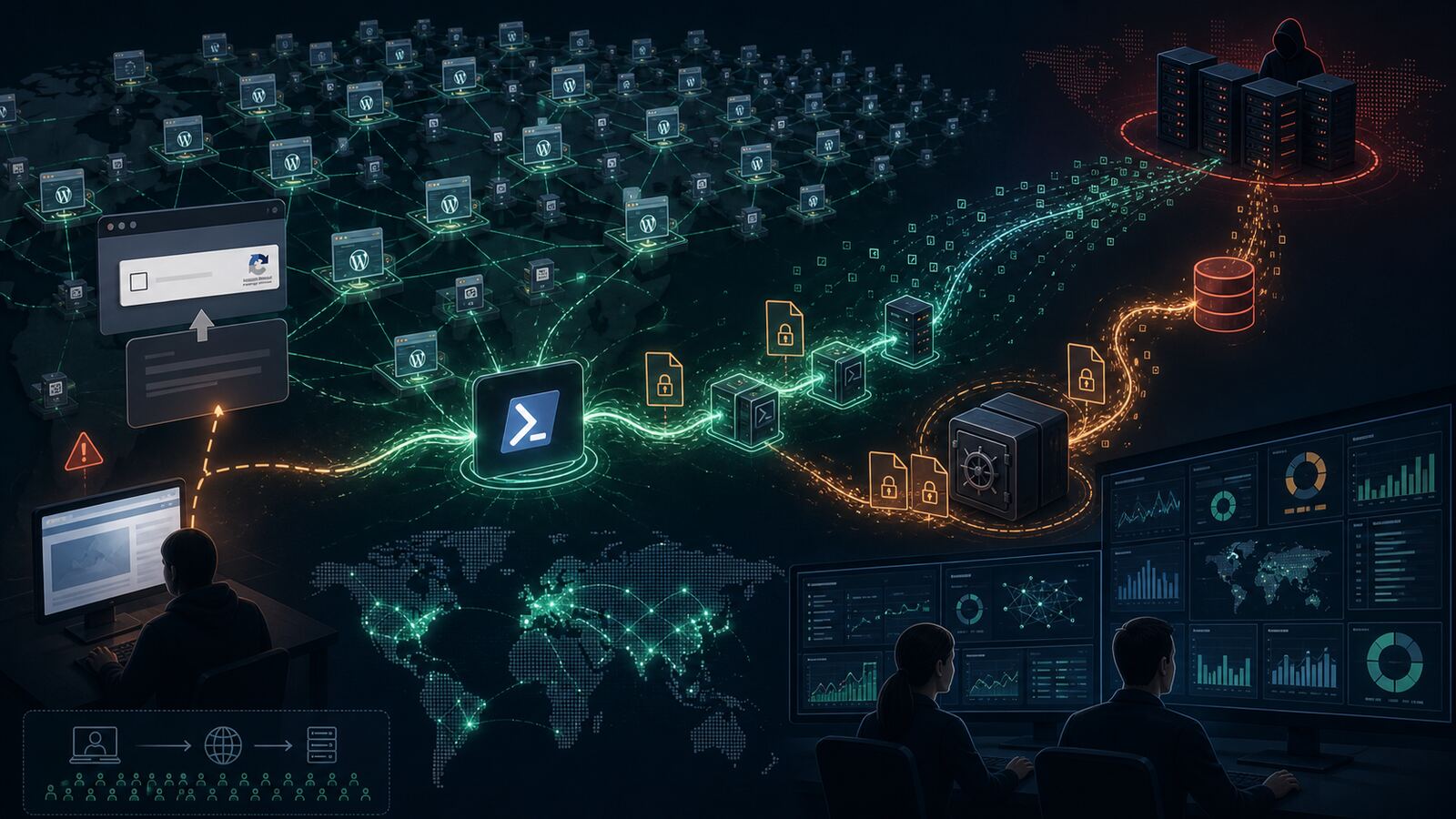
Check Point Research published a detailed report on StopAndProtect, a criminal operation that turns compromised WordPress sites into malware delivery, command-and-control, log collection, and stolen-data storage infrastructure.
The headline is not just “another ransomware family.” The bigger defensive lesson is that ordinary websites can become attack infrastructure at scale when they are old, under-patched, poorly monitored, or running vulnerable plugins. StopAndProtect appears to combine ClickFix social engineering, PowerShell execution, staged .NET loaders, ransomware, data theft, screen locking, lateral spread, and victim chat tooling behind a web of abused WordPress servers.
What Check Point found
Check Point says the campaign begins with a fake CAPTCHA-style ClickFix prompt on compromised websites. Victims are tricked into running a PowerShell command, which starts a multi-stage infection chain. The early stages download and execute additional payloads; later stages can deploy components for encryption, credential theft, file collection, removable-media or SMB spread, lock-screen behavior, and attacker-to-victim chat.
The operation also made unusual operational mistakes. Exposed directories and PHP scripts on hacked WordPress servers reportedly revealed logs, screenshots, malware components, victim-uploaded archives, and source material for the attacker’s own management tools. That visibility gave researchers a rare view into the scale of the campaign and the way the actor managed compromised sites.
Several details matter for defenders:
- Compromised WordPress sites are doing more than hosting payloads. They are used for delivery, command routing, logging, and storage of stolen material.
- ClickFix remains a high-value initial access technique. The victim is persuaded to run the first command manually, which can bypass many assumptions about drive-by exploitation.
- The malware is modular. Not every victim gets ransomware; some infections focus on collection, screenshots, password or wallet theft, and operator-directed file retrieval.
- WordPress persistence can hide outside the normal plugin view. Check Point described must-use plugin behavior and custom upload endpoints that would not look like a normal user-installed plugin.
- The scale is not theoretical. The exposed material pointed to thousands of impacted IP addresses and large numbers of compromised WordPress domains.
Why this matters for SMBs and government contractors
Small businesses and government contractors often rely on WordPress for marketing sites, landing pages, subcontractor portals, blogs, forms, recruiting pages, and campaign microsites. Those sites may sit outside the main security program because they are “just the website.” StopAndProtect is a reminder that attackers see them differently: as trusted infrastructure, staging locations, redirectors, and places to blend malicious traffic into normal web noise.
For defenders, that changes the risk model. A neglected WordPress install can become part of someone else’s intrusion chain, even if the organization’s own internal network is never breached. That can create reputational damage, hosting suspension, search-engine warnings, incident-response cost, customer trust problems, and legal exposure if stolen data or malware traffic is stored under the organization’s domain.
There is also a second-order risk. If employees, vendors, or clients trust the organization’s domain, a compromised page can carry more credibility than a newly registered malicious site. ClickFix prompts, fake CAPTCHA pages, bogus verification flows, and browser “repair” instructions become more convincing when they appear on legitimate infrastructure.
Defensive takeaways
1. Treat public websites as production assets
Inventory every WordPress instance, including old microsites, test installs, forgotten subdomains, and vendor-managed pages. Assign an owner, patch cadence, backup plan, logging source, and decommission path. If nobody owns it, attackers eventually will.
2. Monitor for unexpected PHP and must-use plugins
Review wp-content/plugins, wp-content/mu-plugins, upload directories, theme folders, and web roots for new PHP files, upload handlers, file managers, proxy scripts, and suspicious REST endpoints. Must-use plugins are especially important because they can run automatically and may not appear in the standard plugin management workflow.
3. Lock down file upload paths
Block PHP execution in upload directories, restrict writable paths, and alert on executable files appearing where only media should exist. If a form plugin needs uploads, validate file type, extension, MIME type, destination path, and server-side execution rules.
4. Hunt for ClickFix patterns
On endpoints, watch for browsers followed by clipboard-driven PowerShell, hidden windows, execution-policy bypasses, web download cradles, encoded commands, and .NET payload loading. On web infrastructure, look for pages that inject fake CAPTCHA overlays, copy commands to the clipboard, or redirect only selected visitors.
5. Review outbound and inbound web telemetry together
StopAndProtect shows why web-server logs, endpoint telemetry, DNS, proxy data, and EDR events should not live in separate worlds. A compromised website may show unusual PHP hits, file uploads, directory-listing probes, or payload retrieval while victim endpoints show PowerShell and archive exfiltration behavior.
6. Use recovery drills, not just backups
Backups are useful only if they are clean, restorable, and separated from attacker-controlled access. Practice restoring a WordPress site, rotating credentials, invalidating application passwords, replacing secrets, and redeploying from a known-good source.
Bulwark Black assessment
StopAndProtect is a good example of the modern “borrowed trust” problem. Attackers do not need to build all their own infrastructure when they can compromise legitimate websites, reuse their reputation, and make defenders chase traffic across hundreds or thousands of real domains.
For SMBs and government contractors, the practical move is to close the gap between web administration and security operations. WordPress patching, plugin governance, upload restrictions, WAF tuning, endpoint detection, and identity controls all connect here. A web server compromise can become malware infrastructure; a ClickFix endpoint compromise can become credential theft; stolen credentials can then become the next web compromise.
Bottom line: do not treat your public website as a brochure. Treat it as internet-facing infrastructure that can be weaponized against your users, your customers, and other organizations if it is not maintained and monitored.
Original source: Check Point Research — Thousands of Hacked WordPress Sites, One Operation: Unmasking StopAndProtect.